Project Progress

Releases & Updates.

See how Project Kestrel is evolving to become the gateway to your photography.

June 15, 2026
v(Rufous Hummingbird)

The launch of Perch and Cloud Compute — and a celebration of 1.5 million photos analyzed by Kestrel. Perch lets you share an entire birding outing on the web as a personalized timeline, not just a single photo. Cloud Compute offloads large backlogs to fast cloud GPUs running the exact same Project Kestrel pipeline. New accounts start with free Perch storage (3 GB / ~15,000 photos) and 2,500 images of Cloud Compute credits to try.

Major Changes

  • Introducing Perch — share entire birding outings with anyone.
    • Perch is a sharing platform centered on the experience of birding: upload an entire timeline of everything you saw on your outing, personalize it with notes, and share it with anyone.
    • To get started, open an analyzed folder and click "Share with Perch." Follow the steps to upload your timeline, then open your Perch on perch.projectkestrel.org to add notes and pick favorites. Viewers can browse your timeline, search by species, read your notes, leave comments, and like their favorites.
    • Free for everyone: 3 GB of storage per account (~15,000 photos), with tag-sync to keep species and scientific names up to date.
    • Perch is a completely optional extension of Project Kestrel — no account is needed to keep using the free and open-source desktop app.
  • Introducing Cloud Compute — offload analysis to cloud GPUs.
    • Hand a big backlog to the cloud and keep working locally; it runs the exact same Kestrel pipeline, spread across up to 3 GPUs at once.
    • New accounts get 2,500 images of cloud-analysis credits to try. Simply sign in, then click Cloud Analysis in the Analyze Folders dialog.
    • See your job history, track usage, and manage your account at myaccount.projectkestrel.org.
    • Privacy by design: your photos are deleted from the cloud as soon as they are analyzed, and results are deleted as soon as your desktop receives them.
    • Cloud Compute is a completely optional extension — no account is needed to keep using the free desktop app — and subscribing is a great way to support Kestrel's solo developer.
  • Account management, right in the desktop app.
    • Sign in to use Perch or Cloud Compute. See your Cloud Compute job history, download ready results, cancel in-progress jobs, and track usage — or open your full account portal from Manage my Account.
    • When submitting feedback or bug reports as a signed-in user, you can optionally attach your account information.
  • Privacy, security & legal.
    • Project Kestrel's license is now the less-restrictive AGPLv3, and the Privacy Policy and Terms of Use have been updated.
    • The local OS username is stripped from log and traceback paths before any feedback or crash report leaves your device, and automatic crash-report sending is now opt-out in Settings.

Minor Changes

  • Fixed a bug where you could not open two instances of Project Kestrel at once.
  • Fixed a bug leading to unnecessary crashes for some Windows users.
  • New searchable dropdown for family tags, matching the species-tag improvements from v(Great-Horned Owl).
  • Polished user interface across the app.

Feedback? Please visit projectkestrel.org/contact or use the in-app feedback feature!
May 24, 2026
v(Great-Horned Owl)

A user-interface overhaul, an order-of-magnitude expansion to species tagging, and the first release published under Project Kestrel LLC. Kestrel's main GUI and Analyze Folders dialog have been completely redesigned for clarity and simplicity, and a new regional bird catalog brings searchable, fuzzy-matched coverage of all ~11,250 global bird species — up from the 500 labels the ML model produces.

Major Changes

  • Regional bird catalog — ~11,250 species, fuzzy search, 4-letter codes, sci-name toggle.
    • Species and family comboboxes now search a bundled global catalog built from the IOC World Bird List (v15.1, CC-BY 3.0) and IBP-AOS Alpha Codes (66th AOS Supplement, 2025) — expanded from the 500 labels the ML model produces.
    • Intelligently search through all your regions' bird species and families while typing the name of the tag.
    • New Species & Region settings section with a multi-region picker (defaults to North America) and a Show scientific names toggle that renders the Latin binomial in italics under each species pill and shows the scientific family name on family pills.
    • New keyboard shortcuts: Ctrl+R and Ctrl+Shift+R + Tab help you label your scenes without leaving the keyboard.
  • Redesigned Analyze Folders dialog (3-column layout).
    • New layout: Queue Builder (add folders + recents chips + dialog-local tree), Settings (critical knobs always visible, advanced collapsed), Queue Summary + Start (live counts, warnings, per-folder list).
    • Dialog state is fully independent from the main sidebar tree, so picking folders to analyze no longer disturbs what you're browsing.
    • New recents row with a chip strip of recently-queued folders, persisted across sessions.
    • Live local-rate time estimates use a new perf-samples history (GPU vs CPU tracked separately).
  • Redesigned home page — less cluttered, segmented controls.
    • Old three-button header replaced by a single + Load Folders… button, recents chips, empty-state hint, and a clean Clear / Select All ↔ Select None segmented strip at the bottom.
    • Sidebar footer is now a segmented strip (Settings | Feedback | Tutorial | Donate); the zoom widget (slider + buttons) has moved to the bottom status bar where it belongs.
    • In-progress folders are now marked with a lightweight ⌛ hourglass emoji instead of the old purple-background-and-italic-text styling.
  • Homepage simplified — search/filter/sort moved to a sticky top bar.
    • The two large "First time" / "Returning" welcome cards are gone — the welcome panel now focuses on the What's New banner and the rotating tip carousel.
    • Search, confidence, sort, and grouping/multi-subject toggles moved out of the sidebar into a new sticky timeline filter bar above the timeline, with a ⚙ More ▾ popover for less-used options.
  • New Folder Actions dropdown and Clear Kestrel Data confirmation.
    • Per-folder actions menu in the scene grid for re-analysis, removal, and clearing analyzed data.
    • Clear Kestrel Data is now gated by a typed-confirmation dialog before the .kestrel/ folder is removed.

Minor Changes

  • macOS USB-drive crash fix — Sony A1 users on macOS-mounted exFAT/NTFS drives no longer see a wall of "Unsupported file format" errors. The pipeline now skips macOS AppleDouble (._*) companion files and all other dot-prefixed files (.DS_Store, etc.) at every enumeration site.
  • macOS ONNX null-cascade fix — when a CoreML GPU promotion failed mid-analysis, every subsequent image used to crash with an AttributeError. The resilient session now restores the previous session on rebuild failure, and the provider coordinator forces a clean CPU rebuild after a failed GPU promotion.
  • Windows 64-bit shutdown-watch fix — switched WNDPROC callbacks to pointer-sized types so 64-bit LPARAM values stop throwing OverflowError: int too long to convert on every affected Windows session.
  • Removed clunky "Loading Kestrel Analyzer…" overlay that briefly appeared on analysis start.
  • Tightened scene-card layout to reduce visual noise and increase information density.
  • API cleanup — removed redundant logging on every settings get/save; new get_bird_catalog_meta, search_birds, and lookup_birds bridge methods (catalog cached on the bridge instance).
  • 700+ new lines of test coverage for the bird catalog, settings, folder inspector, and config helpers.
  • Project Kestrel LLC — the Microsoft Store appxmanifest PublisherDisplayName is updated from "Project Kestrel" to "Project Kestrel LLC" this release, reflecting the new corporate entity.

Known Issues

  • Re-queueing a pending folder ignores new analysis options — If a folder is already in the queue (pending or running) and you change its per-folder options (e.g. "Delete existing analysis data first" or "Skip if already analyzed") and click Start again, the new options will be silently dropped. Workaround: remove the folder from the queue first, then re-add it with the desired settings.

Feedback? Please visit projectkestrel.org/contact or use the in-app feedback feature!

May 17, 2026
v(Nelson's Sparrow)

A stability, resilience, and developer-experience release built on top of the Gambel's Quail pipeline. Nelson's Sparrow adds a new fast wildlife detector (MegaDetector v1000-cedar), resilient ONNX execution that recovers from GPU/driver failures, OS-shutdown detection that finally silences phantom crash dialogs, major expansion of camera/RAW format support, and the largest test-suite expansion in the project's history (~350 tests). Several latent performance and accuracy bugs are also fixed, including a duplicated SpeciesNet batch pass that was silently reducing Gambel's Quail speedup.

Major Changes

  • Resilient ONNX execution recovers from GPU and driver failures across all six ML models.
    • Detects DirectML (Windows) and CoreML (macOS) inference failures and transparently falls back to CPU, preserving partial results.
    • A new "Re-attempt analysis on errored images" action re-queues just the failed files without touching successful work.
    • New GPU-resilience settings in the Analyze Folders dialog let you tune fallback behavior.
  • Major RAW-format expansion — adds first-class decode and EXIF-timestamp extraction for 11 additional camera formats, plus an embedded-preview fallback for compression schemes LibRaw can't yet decompress.
    • Newly supported: Nikon NRW (Coolpix, Z), Hasselblad 3FR/FFF, Phase One IIQ, Leaf MOS, Leica RWL, Epson ERF, Kodak DCR/KDC, Mamiya MEF, Minolta MRW.
    • Now extracts EXIF timestamps: Fujifilm RAF and Sigma X3F (they previously decoded but were timestamp-blind).
    • Nikon Z8 / Z9 / Zf / Z6III "High Efficiency" (HE/HE*/NRAW) NEFs — where LibRaw can't decompress the proprietary TicoRAW codec — now load via the full-resolution embedded JPEG preview. Detection and classification accuracy are unaffected at Kestrel's ML input resolution; only sensor-level highlight recovery is disabled, and the Live analysis dialog displays a "⚠ preview fallback" notice for affected files.
  • New "Fast" wildlife detector — MegaDetector v1000-cedar replaces the older mdv6-mit-yolov9 family. The Accurate option (mdv5a) is retained after edge-case testing in Gambel's Quail confirmed it was the better default for thorough analysis.
  • Real-crash vs. OS-shutdown detection — PC reboots, logoffs, and power loss no longer trigger the alarming "did not shut down cleanly" dialog.
    • Platform-specific listeners on Windows, macOS, and Linux distinguish OS-driven exits from real crashes.
    • Crash reports now carry an exit_reason field so genuine crashes are no longer drowned out by shutdown noise.
  • Full command-line parity with the in-app Advanced Analysis Settings dialog — every analysis knob is now exposed on analyzer/cli.py for power users and scripted workflows.
  • New quality normalization curve (v3) rebalances star ratings: the lower tail moves up and the upper tail compresses slightly. Older .kestrel/ folders are flagged and re-rated against the new curve on next visit.
  • Massive test-suite expansion — ~350 tests reorganized under unit / integration / compat / UI / security directories, with backward-compat tests for every legacy database schema and a real-binary UI probe in CI.
  • Build attestation for official builds — a signed build bundle is now used for in-app updater authentication, replacing the legacy fallback for official releases.

Minor Changes

  • Removed a duplicate SpeciesNet batch-classifier block that was running the ONNX classifier twice per image and erasing roughly half of the Gambel's Quail batch-processing speedup.
  • Culling-preview RAW decode no longer runs postprocess() twice on non-zero exposure correction (saves ~1–2 seconds per 45MP RAW per slider movement).
  • Build attestation now keeps trying candidate paths instead of giving up on the first malformed bundle.
  • The clean-exit handler no longer clobbers an already-set OS-shutdown / crash exit reason on the way out.
  • The max-bird-crops cap is now applied before SAM-HQ runs, so segmentation work is skipped for discarded detections.
  • SAM-HQ now runs in batched mode with updated weights; SpeciesNet classifier is also batched.
  • Model label files now decode with explicit BOM-tolerant UTF-8, fixing mojibake on Spanish, Japanese, and Chinese Windows installs.
  • Per-image analysis errors now emit a full Python traceback to the runtime log so future crash reports identify the offending library and call site.
  • Species-detection UI improvements with taxonomy mapping (cleaner labels, better tag suggestions).
  • Dropped unused PyQt6 dependency (~100 MB off the dev install); bumped rawpy, pyinstaller, pywebview, requests, pillow, and numpy.

Feedback? Please visit projectkestrel.org/contact or use the in-app feedback feature!

April 19, 2026
v(Gambel's Quail (Plume Fix))

The most significant update to Project Kestrel to date. Kestrel is up to 500% faster while achieving better analysis quality, and now supports more than 1,200 wildlife species in addition to birds.

Major Changes

  • New analysis pipeline (v2.0) delivers up to 500% performance improvement over v(Kentucky Warbler) while improving bird detection sensitivity and exposure compensation performance.
    • New wildlife detection model powered by MegaDetector delivers significant improvements in detection sensitivity across animal types.
    • New wildlife species classifier powered by SpeciesNet enables identification of up to 1,200 wildlife species.
    • New image segmentation model powered by SAM-HQ substantially improves identification of specific bird pixels.
    • ONNX Runtime migration of all models (including the existing quality classifier) enables GPU utilization and delivers substantial performance improvements on all systems.
    • New exposure compensation algorithm performs 10× faster than v(Kentucky Warbler) and significantly better on poorly-lit bird images.
    • New parallel file processing (configurable in Settings) delivers up to 3× performance improvement in RAW decode speed.
    • The new pipeline is faster and more accurate. Huge thanks to the teams behind MegaDetector, SpeciesNet, and SAM-HQ for their incredible open-source work.
  • Large number of user interface tweaks make Kestrel more intuitive:
    • All analysis-specific settings have been moved into the Analyze Folders dialog for clarity and proximity.
    • Improved timeline visualization no longer strictly groups photos by the hour. A new "Adjust Capture Time" dialog lets you correct your camera's capture time (e.g., Daylight Savings Time).
    • Exposure compensation is now applied to image thumbnails (toggleable in Settings), making it easier to view image details across lighting conditions.
    • New ability to see the bird thumbnail side-by-side while browsing your photos.
    • Scene view additions: "Mark as Reviewed" button, "Open in [photo editor]" button, and dedicated buttons to switch subjects in multi-subject scenes.
    • Revamped in-app tutorials with separate Basic and Advanced branches, plus a rotating welcome-panel tips carousel for ongoing feature discovery.

Minor Changes

  • Updated Privacy Policy and Terms of Use to clarify that some file names may be transmitted when reporting bugs or crashes.
  • Several bug fixes:
    • Fixed a bug where the tutorial would keep popping up for some users who upgraded their version of Kestrel.
    • Fixed a bug where Kestrel would erroneously believe it had crashed, prompting the user to send a crash report.
    • Fixed a bug where images would appear "split in half" when viewed rapidly.
    • Fixed a bug causing user-specified culling decisions and similar edits to be overwritten if Kestrel was still analyzing the folder during review.
    • Fixed bugs causing some scenes to appear hazy or tinted on certain camera models.
  • Thank you to the MegaDetector, SpeciesNet, and SAM-HQ teams for their open-source contributions!

Feedback? Please visit projectkestrel.org/contact or use the in-app feedback feature!

April 2, 2026
v(Kentucky Warbler)

Major update featuring significant corrections to exposure compensation algorithm, improved quality scoring model, many UI improvements, bug fixes, compatibility improvements, security improvements, and more.

Major Changes

  • New Exposure compensation solver algorithm ensures that the bird in the image is always properly exposed. This improves quality ranking accuracy, species detection accuracy, and makes it easier to review your photos!
    • New setting to tweak exposure compensation solver performance to your needs.
  • Substantial user experience improvements:
    • New "Quick Copy" buttons let you directly copy bird crops or whole image exports to your clipboard.
    • New adjustable divider lets you resize the bird crop to full image preview space.
    • New "Suggested Species" tags make it easier to add tags based on machine learning model outputs.
    • Improved split scene behavior (use Shift+Click to split scenes).
    • "Only manually reviewed scenes" toggle now reflects culling decisions, scenes with reviewed tags, and renamed scenes.
  • Improved multi-bird handling:
    • Kestrel now detects, analyzes, and saves results for up to 5 birds within the same image.
    • Browse through detected birds using up/down arrow keys; hit "Enter" to assign a primary bird.
  • Model & Performance Updates:
    • Upgraded quality classification model for substantially improved performance.
    • Improved performance on scenes with many subjects via model parameter tweaks.
    • Security improvements (reduced HTTP endpoint exposure, settings schema validation).
    • Improved crash handling/recovery with automatic queue restoration.

Minor Changes

  • Fixed bugs on Canon EOS R5 Mk II by upgrading rawpy dependency.
  • Upgraded tensorflow, torch, and other dependencies to latest versions.
  • Improved auto-save performance and consistency.
  • Fixed bugs related to loading/unloading folders during analysis.
  • Fixed bug where JPG files would not be co-moved via culling assistant.
  • Fixed bugs with scene navigation.

Known Issues

  • Analysis time may be slightly slower due to the new exposure algorithm; use "Normal" or "Lenient" profiles to reduce overhead.
  • Default star rating normalization algorithm is being refined.

Coming soon

  • Website will be updated to reflect latest analysis framework and new features.

Feedback? Please visit projectkestrel.org/contact or use the in-app feedback feature!

March 19, 2026
v(Willow Ptarmigan) Hotfix 1

NOTE: This is a hotfix release to Project Kestrel v(Willow Ptarmigan) that fixes a critical bug preventing Kestrel from analyzing folders on MacOS. This update is not applicable for Windows users.

Key Fixes (MacOS only)

  • Fixed folder analysis: Resolved a critical bug preventing Kestrel from analyzing folders on MacOS.
  • Quality Classifier: Fixed a bug preventing successfully running the quality classifier model on MacOS.
March 17, 2026
v(Willow Ptarmigan)

Major user interface/user experience update coupled with improvements and customizability to the analysis pipeline. This is a massive update to expand Kestrel's functionality and intuitiveness.

Version Willow Ptarmigan Changelog

  • Major improvements to Kestrel User Interface! Kestrel now shows your scenes in a filmstrip style view, allowing you to rapidly relive your memories and select which ones to edit and share.
    • New keyboard shortcuts let you rapidly flick through a scene and seamless advance to previous/next scenes.
    • New accept/reject tagging system lets you make culling decisions from the scene visualizer.
    • Streamlined user interface maintains all functionality: rename the scene, edit tags, split the scene into multiple scenes, and view RAW previews.
  • Improvements to Kestrel Culling Assistant and handling of culling decisions:
    • New streamlined user interface allows you to drag and drop images in addition to using Shift+Click.
    • New buttons to reset Culling Decisions allow you to reset Accept/Reject Ratings.
  • Significant improvements to Kestrel's analysis pipeline:
    • New configurable rating system lets you customize how Kestrel assigns star ratings to your scenes.
    • New exposure compensation algorithm improves analysis options.
    • Fixed bugs with Kestrel's scene grouping algorithm.

Minor Changes

  • Other User Interface tweaks:
    • Consolidated buttons in the main GUI.
    • Updated in-app tutorials to thoroughly explain all new features and workflows.
    • Improvements to how Kestrel writes metadata to align more consistently with visuals.
    • Tweaks to simplify language around metadata and culling categories.
    • Improved handling of auto-generated ratings and auto-generated culling decisions to enhance consistency and decouple the two features.
    • Show pipeline version in addition to standard version control.
  • Substantial number of bug fixes, particularly around the user interface, settings menu, and culling assistant.

Coming Soon

  • Video Tutorial is coming soon on projectkestrel.org
  • Projectkestrel.org will be updated to reflect the full capabilities of Project Kestrel
  • No major features are planned at this time; user feedback is requested as soon as possible.
  • GPU support is on the roadmap; as are improvements to species classification.

Feedback? Please visit projectkestrel.org/contact or use the in-app feedback feature! I really need feedback! Please provide feedback. Thank you!

Thank you for trying Project Kestrel! Download Kestrel from the Microsoft Store by visiting www.projectkestrel.org for automatic updates.

March 15, 2026
v(Lincoln's Sparrow)

Welcome to Project Kestrel v(Lincoln's Sparrow)! Kestrel receives an significantly improved quality scoring model and significant analysis customizability. Kestrel will now more accurately rank your photos by quality, particularly in photos where default lighting conditions are sub-optimal.

Key Changes

  • Major update: Substantial improvements to quality estimation using a new machine learning model.
  • Exposure Compensation: New exposure compensation algorithm applies exposure compensation to improve quality estimation performance in bright and dim images. New machine learning model reflects these changes in the quality determination pipeline.
  • Rating Normalization: New rating normalization algorithms let you control Kestrel's auto-determined ratings. Look for these options under "Settings".
  • Group Detection: Significant improvements to group detection methodology should reduce the number of false groupings.

Minor Changes

  • Several bug fixes and UI improvements.
  • Fixed bugs with RAW preview handling on MacOS devices being blurry.
  • Fixed bugs with inconsistent application of exposure correction algorithm.
  • Fixed bugs preventing the user interface from updating to reflect newly analyzed images while analysis is in progress.
  • Fixed bugs in user interface related to the new split scene and scene tag modification system.
  • Fixed a bug where the ETA calculation would not update when resuming analysis of a folder that has previously been started.
  • Improved UI by reorganizing settings menu and providing several options to customize analysis parameters.
  • Improved UI to show max star rating rather than max Quality.
  • Improved UI to implement auto-save functionality by default.
  • Improved UI to offer more information when a new version or update is available.

Coming Soon

  • Video Tutorial is coming soon on projectkestrel.org
  • Projectkestrel.org will be updated to reflect the full capabilities of Project Kestrel
  • No major features are planned at this time; user feedback is requested as soon as possible.
  • GPU support is on the roadmap; as are improvements to species classification.

Feedback? Please visit projectkestrel.org/contact or use the in-app feedback feature! I really need feedback! Please provide feedback. Thank you!

Thank you for trying Project Kestrel! Download Kestrel from the Microsoft Store by visiting www.projectkestrel.org for automatic updates.

March 13, 2026
v(Swamp Sparrow)

Welcome to Project Kestrel v(Swamp Sparrow)! Kestrel gets significant improvements to the analysis options and user interface!

Key Changes

  • New Group Detection Algorithm: Utilizes timestamps to more accurately group burst shots, particularly of birds in flight! New setting to change the auto-grouping time-based threshold.
  • Improved Quality Scoring: Improved quality scoring and species classification accuracy in poorly-lit conditions by implementing exposure shifting within the pipeline.
  • Reduced False Positives: Reduced false positive bird detection rate + new setting to control bird detection threshold.
  • New "Timeline" Visualization Mode: Review your birding expedition hour by hour.
  • Metadata Editing: You can now edit each scene's species and family tags, which will be reflected in the search capabilities!
  • RAW Preview Support: RAW preview mode is supported in the scene view as well!
  • Updated Rating System: Kestrel's auto-generated quality ratings are now standardized to your photo library, making the ratings more useful for your unique setup and style. Change this anytime in settings.

Minor Changes

  • UI Tweaks and Bug Fixes
  • New database structure (maintains backward-compatibility)

Coming Soon

  • Video Tutorial is coming soon on projectkestrel.org
  • Projectkestrel.org will be updated to reflect the full capabilities of Project Kestrel
  • No major features are planned at this time; user feedback is requested as soon as possible.
  • GPU support is on the roadmap; as are improvements to image quality classification and species classification.

Feedback? Please visit projectkestrel.org/contact or use the in-app feedback feature! I really need feedback! Please provide feedback. Thank you!

Thank you for trying Project Kestrel! Download Kestrel from the Microsoft Store by visiting www.projectkestrel.org for automatic updates.

March 11, 2026
v(Yellow Warbler)

Welcome to Project Kestrel v(Yellow Warbler)!

Kestrel's scene detection has been substantially improved, particularly for birds in flight. Kestrel also gets several bug fixes and UI improvements.

Key Changes

  • Better Burst Grouping: Massive improvement to Kestrel's scene/burst detection methodology, especially for birds in flight. Kestrel now uses photo timestamps in addition to comparing the photos themselves to determine scenes.
  • New scene editing features: Split a scene into multiple scenes, and edit the species and family tags associated with a scene for improved searchability!
  • Improved Kestrel Culling Assistant: New "Reject All" and "Accept All" Buttons
  • Expanded RAW Editor Support: Kestrel now lets you select out of 16 RAW editors to open photos with, and you can set your own custom executable path.

Minor Changes

  • Several UI Improvements
    • Kestrel will prompt you to save changes before closing or before opening the Kestrel Culling Assistant.
    • Improved Settings, Live Analysis, and Scene GUI
    • New feature to opt-in to additional wildlife species detection (beyond just birds)
  • Kestrel will prompt you to re-analyze folders that have been analyzed with an older version of the pipeline. Use this to re-analyze scenes with birds in flight!
  • Ability to clear Kestrel analysis data by right-clicking on a folder in the main view.
  • Removed "Use GPU When Available" checkbox since GPU is not supported.

Coming Soon

  • Video Tutorial is coming soon on projectkestrel.org
  • Projectkestrel.org will be updated to reflect the full capabilities of Project Kestrel
  • No major features are planned at this time; user feedback is requested as soon as possible.
  • GPU support is on the roadmap; as are improvements to image quality classification and species classification.

Feedback? Please visit projectkestrel.org/contact or use the in-app feedback feature! I really really really need feedback! Please provide feedback. Thank you!

Thank you for trying Project Kestrel! Download Kestrel from the Microsoft Store by visiting www.projectkestrel.org for automatic updates.

March 9, 2026
v(Tufted Titmouse)

Welcome to Project Kestrel v(Tufted Titmouse)! Project Kestrel gets bug fixes, UI improvements, and a new logo.

Key Changes

  • New Logo! Project Kestrel features a new logo, an American Kestrel morphing into a Camera lens aperture.
  • Improved Bird Detection: Fixed a bug where the software would detect the same bird multiple times, especially with poor quality auxiliary detections.
  • New Write XMP Metadata Button: You no longer need to go through the Kestrel Culling Assistant to write metadata; you can directly export Kestrel's star ratings and import them into your favorite RAW workflow editor.

Minor Changes

  • Updated Tutorial: The in-app tutorial has been updated to reflect the latest workflow.
  • Analytics Fixes: Resolved issues with analytics data collection.
  • Expanded RAW Support: Fixed a bug where TIFF and TIF files would not be supported.
  • Adobe Lightroom Enhancements: Expanded metadata handling to include more fields.

Upcoming Features

  • GPU Support: Hardware acceleration (CUDA/ROCm) is on the roadmap.
  • Video walkthrough: Coming soon to projectkestrel.org
  • Improved Quality Classification: Ongoing improvements to image quality scoring.

Feedback wanted: We are especially interested in feedback on the new culling assistant tool! Does it have the customization you need? Is the XMP metadata export working? How about the RAW previews? Share your thoughts through the in-app feedback feature or at projectkestrel.org/contact.

This release includes contributions from dedicated members of the open-source community. Thank you!

March 4, 2026
v(Chickadee)

Welcome to Project Kestrel v(Chickadee)! Kestrel finally has the ability to create XMP sidecar files that let you import Kestrel's Ratings and Culling Assistant categorizations into Lightroom, Darktable, or any other XMP-aware photo editor! 🎉

Key Changes

  • Kestrel 🔗 Lightroom/Darktable: Kestrel can now produce XMP sidecar files, allowing you to export Kestrel's automatic ratings and Accept/Reject categorizations into your favorite photo editing app!
  • Improved Culling Assistant: New sliders to fine-tune control over the culling process.
  • Code Signing: Kestrel is now available on the Microsoft Store and has been signed by Apple! No more malware warnings; Simply "Drag to Applications" or "Get from the Microsoft Store".

Minor Changes

  • UI Improvements: Substantially improved folder tree and folder queuing dialog systems for better control and intuitiveness.
  • Bug Fixes & Performance: Significantly faster when loading thousands of scenes.

Upcoming Features

  • Video Tutorial is coming soon on projectkestrel.org
  • Projectkestrel.org will be updated to reflect the full capabilities of Project Kestrel

Feedback wanted: I am especially interested in feedback on the new culling assistant tool! Does it have the customization you need? Is the XMP metadata export working? How about the RAW previews?

March 2, 2026
v(Goldfinch-2026.03.01)

Project Kestrel receives a major workflow update with the new Culling Assistant and guided in-app tutorials.

Project Kestrel Culling Assistant
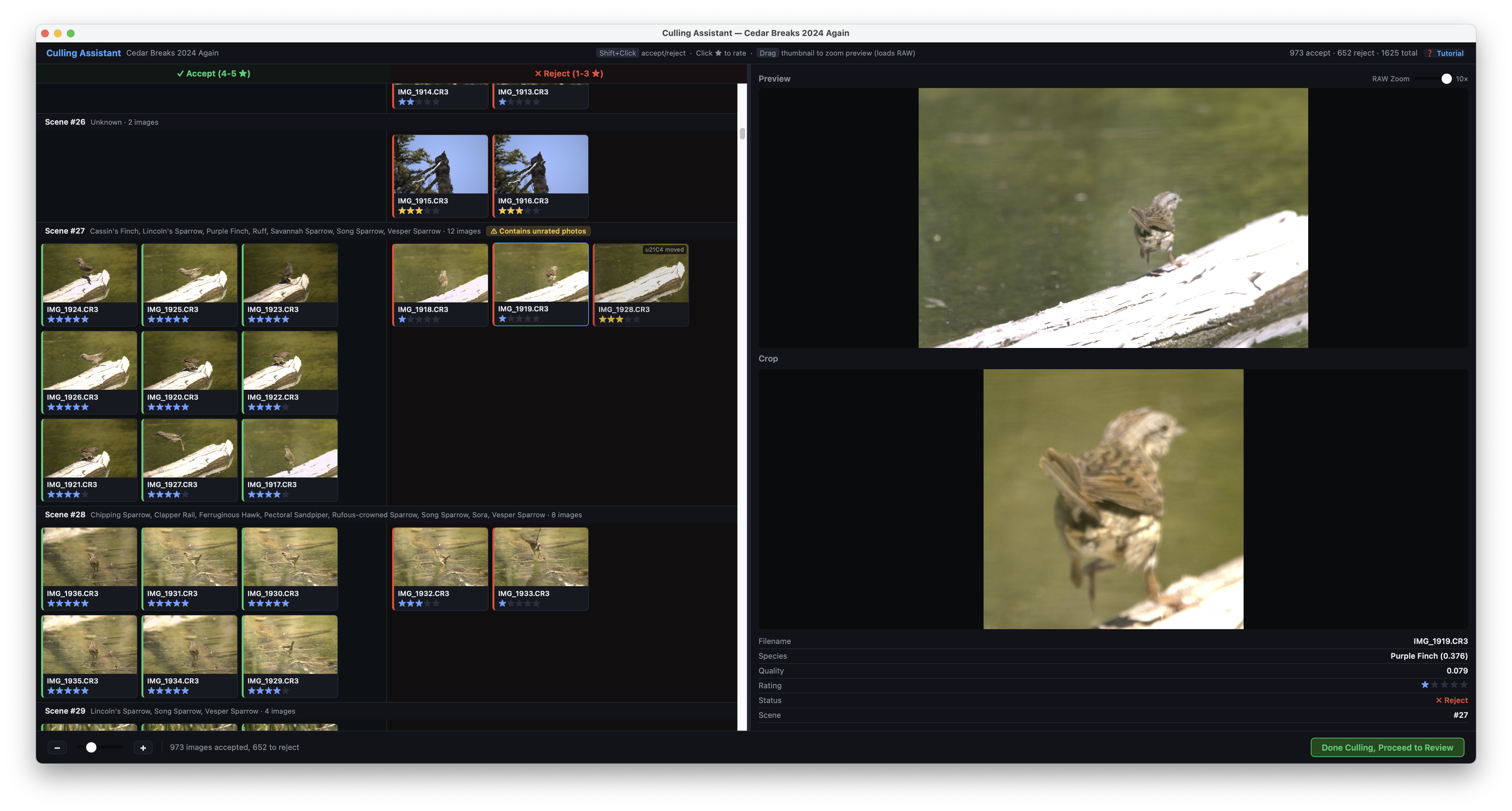
  • New Culling Assistant: Automatically organizes photos into Accept and Reject piles based on Kestrel's rating and analysis.
  • Faster review: Click any image to load a full-resolution preview and cull rapidly scene-by-scene.
  • Quick reassignment: Use Shift+Click to move a photo between Accept and Reject.
  • Autosave progress: Culling decisions are preserved automatically while you work.
  • Safe-by-design: Kestrel only moves rejected images into a dedicated rejects folder and does not delete your photos.
  • New In-App Tutorials: Click Tutorial for guided walkthroughs of both the main window and culling assistant.

Minor changes: New Privacy Policy and Terms of Use, updated usage data policy with optional advanced telemetry opt-in, plus bug fixes and UI improvements.

Coming soon: Video walkthrough on projectkestrel.org/tutorial and XMP sidecar export for Adobe Lightroom workflows.

Feedback wanted: We're especially interested in feedback on the culling threshold behavior (currently ratings below 4 stars default to reject). Share your ideas via projectkestrel.org/contact or the in-app feedback feature.

February 24, 2026
v(Junco-2026.02.24)

Welcome to Project Kestrel v(Junco-2026.02.24)! This update introduces better folder management and integrated feedback tools.

  • Enhanced Folder Queuing: Scan folders and see which ones have not yet been fully analyzed.
  • In-App Feedback: New "Feedback" button to report bugs or provide suggestions directly.
  • Optional Analytics: Opt-in to send basic usage data (file sizes, analysis time) to help improve Kestrel. 100% anonymous.
  • Automatic Version Checking: Get notified if a new version is available on startup.
  • UI & Bug Fixes: Various interface tweaks and stability improvements.

Known Issue: Minor bugs with folder loading during active analysis.

February 20, 2026
v(Finch 2026.02.20)

Version Finch brings a massive interface overhaul and merges the Analyzer and Visualizer into a single, intuitive application.

  • Unified App: No more separate "Analyzer" and "Visualizer" — everything is now in one place.
  • Multi-Folder Exploration: Search through tens of thousands of images across multiple outings simultaneously.
  • Queue Folders: Easily queue multiple folders for background or overnight analysis.
  • Tutorial View: New quick-start tutorial to help you get running as fast as possible.
  • Performance: Massive uplift in loading speeds and general responsiveness.
February 12, 2026
v(Sparrow-2026.02.12)

The initial cross-platform release, bringing Kestrel to both Windows and macOS (Silicon).

  • macOS Support: Full release for Apple Silicon (M1/M2/M3).
  • Dependency Injection: Completely removed the requirement for ImageMagick.
  • PyQt6 & Rawpy: Upgraded core libraries for significant performance gains.
  • Hotfixes: Addressed critical bugs in RAW image parsing and visualizer loading (Feb 15/16).

Want to contribute?

Project Kestrel is open-source. Help us build the future of bird photography by contributing code, reporting bugs, or suggesting features.